Job Hooks System Documentation
Overview
The Job Hooks System allows you to execute custom commands before and after backup jobs. This powerful feature enables you to:
Prepare systems before backups (database dumps, service stops, etc.)
Perform cleanup operations after backups
Run health checks and validations
Send custom notifications or alerts
Integrate with external monitoring systems
Note
Many hook scripts require additional command-line tools (like curl, jq, postgresql-client, etc.).
Use the Package Manager for Pre/Post Hooks to install these tools directly from the Borgitory interface.
Hook Types
Pre-Job Hooks
Pre-job hooks execute before the backup process begins. They are ideal for:
Creating database dumps
Stopping services that lock files
Mounting network drives
Validating system prerequisites
Creating temporary directories
Post-Job Hooks
Post-job hooks execute after the backup process completes. They are useful for:
Cleaning up temporary files
Restarting services
Running health checks
Sending completion notifications
Uploading logs to external systems
Adding Hooks to a Schedule
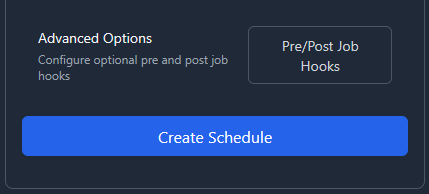
Navigate to Schedule Creation/Editing
Go to the Schedules page
Click “Create Schedule” or edit an existing schedule
Open the Hooks Configuration Modal
Click the “Configure Hooks” button in the schedule form
This opens the hooks configuration modal
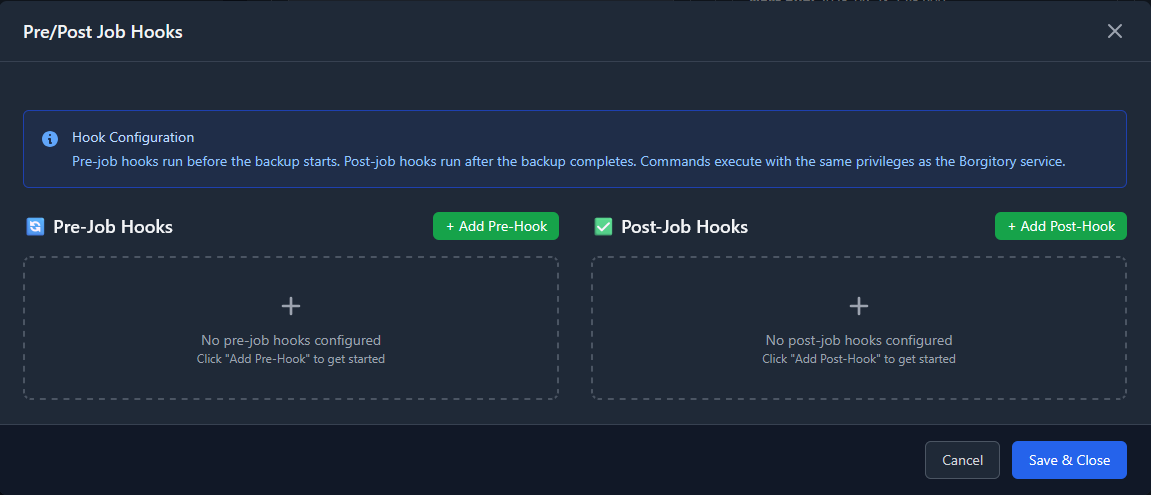
Add Pre-Job Hooks
In the “Pre-Job Hooks” section, click “Add Pre-Hook”
Enter a descriptive name for your hook
Enter the command to execute
Configure hook options (see Hook Options section)
Add Post-Job Hooks
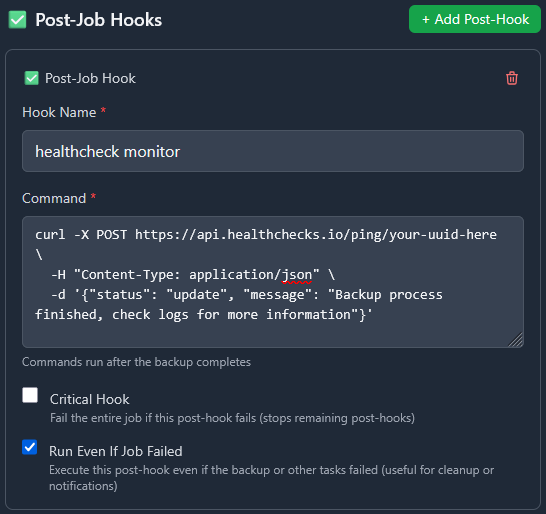
In the “Post-Job Hooks” section, click “Add Post-Hook”
Enter a descriptive name for your hook
Enter the command to execute
Configure hook options (see Hook Options section)
Save Configuration
Click “Save Hooks” to apply your configuration
The modal will close and return you to the schedule form
Complete and save your schedule
Hook Options
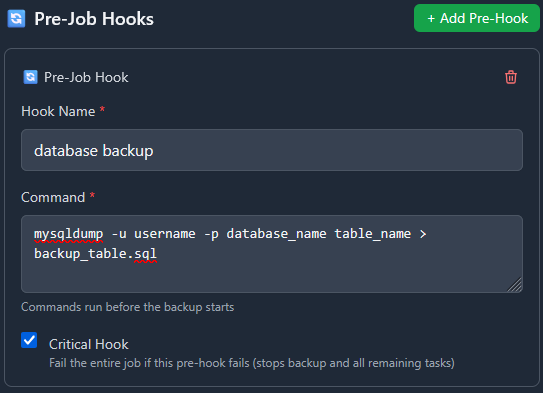
Critical Hooks
What it does: When a hook is marked as “Critical”, the entire job will fail and stop immediately if the hook fails.
Use Cases:
Database Preparation Hook
# Pre-hook: Create database dump
Name: "Database Dump"
Command: "pg_dump myapp > /tmp/myapp_backup.sql"
Critical: ✓ Enabled
Why Critical: If the database dump fails, there’s no point in continuing with the file backup since the database state won’t be captured.
System Prerequisites Check
# Pre-hook: Check disk space
Name: "Disk Space Check"
Command: "df /backup | awk 'NR==2 {if ($4 < 1000000) exit 1}'"
Critical: ✓ Enabled
Why Critical: If there’s insufficient disk space, the backup will fail anyway, so it’s better to fail early.
Service Dependency
# Pre-hook: Stop application
Name: "Stop Web Service"
Command: "systemctl stop nginx && sleep 5"
Critical: ✓ Enabled
Why Critical: If the service can’t be stopped cleanly, files may be in an inconsistent state.
Run on Job Failure (Post-Hooks Only)
What it does: Post-hooks with this option enabled will execute even if the backup job or a critical pre-hook failed.
Use Cases:
Health Check Notifications
# Post-hook: Always send health check
Name: "Health Check Ping"
Command: "curl -X POST https://healthcheck.io/ping/abc123"
Run Even If Job Failed: ✓ Enabled
Why Always Run: External monitoring systems need to know about both successful and failed backups.
Cleanup Operations
# Post-hook: Clean temporary files
Name: "Cleanup Temp Files"
Command: "rm -rf /tmp/backup_staging/*"
Run Even If Job Failed: ✓ Enabled
Why Always Run: Temporary files should be cleaned up regardless of backup success to prevent disk space issues.
Service Restart
# Post-hook: Restart services
Name: "Restart Application"
Command: "systemctl start nginx && systemctl start mysql"
Run Even If Job Failed: ✓ Enabled
Why Always Run: Services should be restarted even if the backup failed to ensure system availability.
Hook Execution Flow
Normal Execution (All Successful)
1. Pre-Hook 1 (Database Dump)        → ✅ Success
2. Pre-Hook 2 (Stop Services)        → ✅ Success
3. Backup Task                        → ✅ Success
4. Prune Task                         → ✅ Success
5. Post-Hook 1 (Restart Services)    → ✅ Success
6. Post-Hook 2 (Health Check)        → ✅ Success
7. Notification                       → ✅ Success

Result: ✅ Job Completed Successfully
Critical Pre-Hook Failure
1. Pre-Hook 1 (Database Dump)        → ❌ Failed (Critical)
2. Pre-Hook 2 (Stop Services)        → ⏭️  Skipped
3. Backup Task                        → ⏭️  Skipped
4. Prune Task                         → ⏭️  Skipped
5. Post-Hook 1 (Restart Services)    → ⏭️  Skipped
6. Post-Hook 2 (Health Check)        → ✅ Success (Run on Failure)
7. Notification                       → ✅ Success

Result: ❌ Job Failed - Critical Hook Error
Backup Task Failure
1. Pre-Hook 1 (Database Dump)        → ✅ Success
2. Pre-Hook 2 (Stop Services)        → ✅ Success
3. Backup Task                        → ❌ Failed (Critical)
4. Prune Task                         → ⏭️  Skipped
5. Post-Hook 1 (Restart Services)    → ✅ Success (Run on Failure)
6. Post-Hook 2 (Health Check)        → ✅ Success (Run on Failure)
7. Notification                       → ✅ Success

Result: ❌ Job Failed - Backup Error
Non-Critical Hook Failure
1. Pre-Hook 1 (Database Dump)        → ✅ Success
2. Pre-Hook 2 (Log Rotation)         → ❌ Failed (Non-Critical)
3. Backup Task                        → ✅ Success
4. Prune Task                         → ✅ Success
5. Post-Hook 1 (Restart Services)    → ✅ Success
6. Post-Hook 2 (Health Check)        → ✅ Success
7. Notification                       → ✅ Success

Result: ⚠️  Job Completed with Warnings
Task Status Indicators
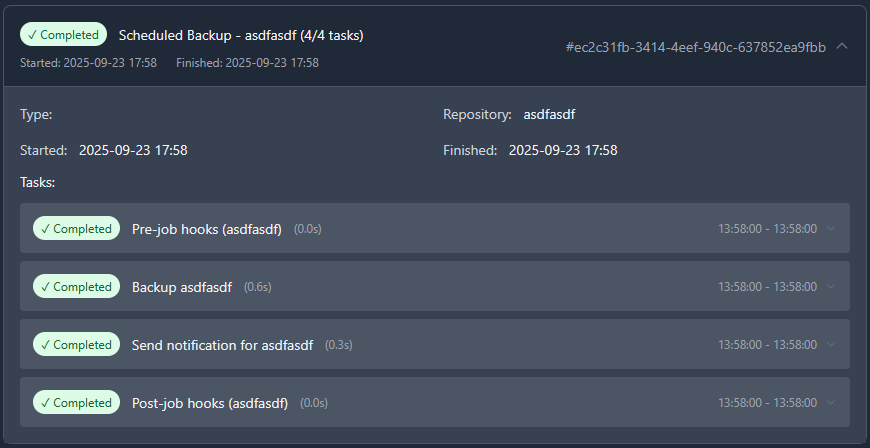
When viewing job history, tasks will show different statuses based on execution results:
✅ Completed: Task executed successfully
❌ Failed: Task executed but failed
⏭️ Skipped: Task was not executed due to an earlier critical failure
⏸️ Pending: Task has not yet been executed (job still running)
Skipped Task Behavior
When a critical hook or backup task fails, all subsequent tasks are automatically marked as “Skipped” with an explanatory message:
Critical Hook Failure: “Task skipped due to critical hook failure”
Critical Task Failure: “Task skipped due to critical task failure”
Critical Task Exception: “Task skipped due to critical task exception”
Environment Variables
Hook scripts automatically receive environment variables with job context:
# Available in all hook scripts
BORGITORY_REPOSITORY_ID="123"     # ID of the repository being backed up
BORGITORY_TASK_INDEX="2"          # Position of this hook in the job sequence
BORGITORY_JOB_TYPE="scheduled"    # Type of job (scheduled, manual)
Example hook using environment variables:
#!/bin/bash
# Pre-hook: Context-aware database dump

DB_NAME="app_repo_${BORGITORY_REPOSITORY_ID}"
BACKUP_FILE="/tmp/dump_${BORGITORY_REPOSITORY_ID}_$(date +%Y%m%d_%H%M%S).sql"

echo "Creating dump for repository ${BORGITORY_REPOSITORY_ID}"
pg_dump "$DB_NAME" > "$BACKUP_FILE"

if [ $? -eq 0 ]; then
    echo "Database dump created: $BACKUP_FILE"
else
    echo "Failed to create database dump for repository ${BORGITORY_REPOSITORY_ID}"
    exit 1
fi
Notification Messages
The notification system provides detailed information about hook failures:
Successful Job
✅ Backup Job Completed Successfully

Backup job for 'MyRepository' completed successfully.

Tasks Completed: 7, Total: 7
Job ID: job-abc-123
Critical Hook Failure
❌ Backup Job Failed - Critical Hook Error

Backup job for 'MyRepository' failed due to critical hook failure.

Failed Hook: Database Dump
Tasks Completed: 0, Skipped: 5, Total: 7
Job ID: job-abc-123
Job with Warnings
⚠️ Backup Job Completed with Warnings

Backup job for 'MyRepository' completed but some tasks failed.

Failed Tasks: hook
Tasks Completed: 6, Skipped: 0, Total: 7
Job ID: job-abc-123

.. figure:: /_static/how-to/job-hooks/failed_prehook.png
   :alt: How to open the failed pre-hook
   :width: 80%
   :align: center
Common Hook Examples
Database Backup Hooks
PostgreSQL Dump (Pre-Hook)
# Name: "PostgreSQL Database Dump"
# Critical: ✓ Enabled

#!/bin/bash
TIMESTAMP=$(date +%Y%m%d_%H%M%S)
DUMP_FILE="/backup/staging/postgres_${TIMESTAMP}.sql"

pg_dump -h localhost -U backup_user myapp_db > "$DUMP_FILE"

if [ $? -eq 0 ]; then
    echo "Database dump created: $DUMP_FILE"
else
    echo "Failed to create PostgreSQL dump"
    exit 1
fi
MySQL Dump (Pre-Hook)
# Name: "MySQL Database Dump"
# Critical: ✓ Enabled

#!/bin/bash
mysqldump -u backup_user -p$MYSQL_PASSWORD myapp_db > /backup/staging/mysql_dump.sql

if [ $? -eq 0 ]; then
    echo "MySQL dump completed successfully"
else
    echo "MySQL dump failed"
    exit 1
fi
Service Management Hooks
Stop Services (Pre-Hook)
# Name: "Stop Application Services"
# Critical: ✓ Enabled

#!/bin/bash
echo "Stopping application services..."

systemctl stop nginx
systemctl stop php-fpm
systemctl stop redis

# Wait for services to fully stop
sleep 10

echo "Services stopped successfully"
Restart Services (Post-Hook)
# Name: "Restart Application Services"
# Run Even If Job Failed: ✓ Enabled

#!/bin/bash
echo "Restarting application services..."

systemctl start redis
systemctl start php-fpm
systemctl start nginx

# Verify services are running
if systemctl is-active --quiet nginx && systemctl is-active --quiet php-fpm; then
    echo "Services restarted successfully"
else
    echo "Warning: Some services may not have started properly"
    exit 1
fi
Health Check and Monitoring Hooks
System Health Check (Post-Hook)
# Name: "System Health Check"
# Run Even If Job Failed: ✓ Enabled

#!/bin/bash

# Check disk space
DISK_USAGE=$(df /backup | awk 'NR==2 {print $5}' | sed 's/%//')
if [ "$DISK_USAGE" -gt 90 ]; then
    echo "Warning: Backup disk usage is ${DISK_USAGE}%"
fi

# Check system load
LOAD=$(uptime | awk -F'load average:' '{print $2}' | awk '{print $1}' | sed 's/,//')
echo "Current system load: $LOAD"

# Ping monitoring service
curl -X POST "https://healthcheck.io/ping/your-uuid-here" \
     -d "Backup completed. Disk: ${DISK_USAGE}%, Load: ${LOAD}"
External Service Integration (Post-Hook)
# Name: "Update Monitoring Dashboard"
# Run Even If Job Failed: ✓ Enabled

#!/bin/bash

# Determine backup status from environment or job context
if [ "$BORGITORY_JOB_TYPE" = "scheduled" ]; then
    STATUS="scheduled_backup_complete"
else
    STATUS="manual_backup_complete"
fi

# Send to monitoring API
curl -X POST "https://monitoring.company.com/api/events" \
     -H "Content-Type: application/json" \
     -H "Authorization: Bearer $MONITORING_TOKEN" \
     -d "{
       \"event\": \"$STATUS\",
       \"repository_id\": \"$BORGITORY_REPOSITORY_ID\",
       \"timestamp\": \"$(date -Iseconds)\"
     }"
File System Preparation Hooks
Mount Network Storage (Pre-Hook)
# Name: "Mount Network Backup Storage"
# Critical: ✓ Enabled

#!/bin/bash

MOUNT_POINT="/mnt/backup_storage"
NFS_SERVER="backup-server.company.com:/exports/backups"

# Check if already mounted
if mountpoint -q "$MOUNT_POINT"; then
    echo "Network storage already mounted"
    exit 0
fi

# Create mount point if it doesn't exist
mkdir -p "$MOUNT_POINT"

# Mount the NFS share
mount -t nfs "$NFS_SERVER" "$MOUNT_POINT"

if [ $? -eq 0 ]; then
    echo "Network storage mounted successfully"
else
    echo "Failed to mount network storage"
    exit 1
fi
Cleanup Temporary Files (Post-Hook)
# Name: "Cleanup Staging Area"
# Run Even If Job Failed: ✓ Enabled

#!/bin/bash

STAGING_DIR="/backup/staging"

echo "Cleaning up staging directory: $STAGING_DIR"

# Remove files older than 1 day from staging
find "$STAGING_DIR" -type f -mtime +1 -delete

# Remove empty directories
find "$STAGING_DIR" -type d -empty -delete

echo "Staging cleanup completed"
Best Practices
Hook Design Guidelines
Make Hooks Idempotent
Hooks should be safe to run multiple times without causing issues.
Use Descriptive Names
Choose clear, descriptive names that explain what the hook does.
Handle Errors Gracefully
Use proper exit codes and error messages for debugging.
Log Important Information
Include relevant output for troubleshooting and monitoring.
Test Hooks Independently
Test your hook scripts manually before adding them to schedules.
Critical vs Non-Critical Decision Matrix
Mark a hook as Critical if:
✅ The backup is meaningless without the hook’s success
✅ Continuing would cause data corruption or inconsistency
✅ System prerequisites are not met
✅ The hook failure indicates a serious system problem
Mark a hook as Non-Critical if:
✅ The hook is for optimization or convenience
✅ Backup can still be valuable even if the hook fails
✅ The hook is for monitoring or reporting
✅ Failure is recoverable or acceptable
Run on Job Failure Decision Matrix
Enable Run Even If Job Failed for post-hooks that:
✅ Restore system state (restart services, unmount drives)
✅ Perform cleanup operations
✅ Send monitoring/health check pings
✅ Handle failure notifications
✅ Reset system configuration
Security Considerations
Hook Script Security
Use Absolute Paths
Always use full paths to executables to prevent PATH manipulation attacks.
Validate Input
If your hooks accept parameters, validate them thoroughly.
Limit Permissions
Run hooks with the minimum required permissions.
Secure Credentials
Store sensitive information in environment variables or secure credential stores.
Log Security Events
Log authentication attempts and access to sensitive resources.
File System Permissions
Ensure hook scripts have appropriate permissions:
# Make hook executable by owner only
chmod 700 /path/to/hook-script.sh

# Set appropriate ownership
chown borgitory:borgitory /path/to/hook-script.sh
Troubleshooting
Common Issues and Solutions
Hook Not Executing
Symptoms: Hook shows as “Failed” immediately without output
Possible Causes: - Script file doesn’t exist or isn’t executable - Incorrect shebang line (#!/bin/bash) - Permission denied
Solutions:
- Verify script path and permissions: ls -la /path/to/script.sh
- Check shebang line is correct
- Ensure script is executable: chmod +x /path/to/script.sh
Hook Times Out
Symptoms: Hook shows as “Failed” after exactly 5 minutes (default timeout)
Solutions: - Increase hook timeout in configuration - Optimize script performance - Add progress logging to identify bottlenecks
Environment Variables Not Available
Symptoms: Hook script can’t access BORGITORY_* variables
Solutions:
- Use env | grep BORGITORY in hook to debug available variables
- Ensure script uses correct variable names (case sensitive)
- Check if custom shell environment affects variable access
Database Connection Failures
Symptoms: Database hooks fail with connection errors
Solutions:
- Verify database credentials and connectivity
- Check if database service is running
- Test connection manually: psql -h host -U user -d database -c "SELECT 1;"
- Consider connection timeouts and retry logic
Service Start/Stop Issues
Symptoms: Service management hooks fail inconsistently
Solutions:
- Add delays after service operations: sleep 5
- Check service status before operations: systemctl is-active service
- Use proper service dependencies and ordering
- Consider using service-specific health checks
Debugging Hook Execution
Enable Detailed Logging
Add debugging output to your hooks:
#!/bin/bash
set -x  # Enable debug output
set -e  # Exit on any error

echo "Hook starting at $(date)"
echo "Environment: $(env | grep BORGITORY)"

# Your hook logic here

echo "Hook completed at $(date)"
Test Hooks Manually
Run hooks outside of Borgitory to test:
# Set up environment variables manually
export BORGITORY_REPOSITORY_ID="123"
export BORGITORY_TASK_INDEX="1"
export BORGITORY_JOB_TYPE="manual"

# Run your hook script
/path/to/your/hook-script.sh
Monitor System Resources
Check system resources during hook execution:
# Monitor disk space
df -h

# Monitor memory usage
free -h

# Monitor running processes
ps aux | grep your-hook-process
Advanced Configuration
Custom Shell Configuration
Hooks can specify custom shell interpreters:
# Python hook
#!/usr/bin/env python3
import os
import subprocess

repo_id = os.environ.get('BORGITORY_REPOSITORY_ID')
print(f"Processing repository {repo_id}")
# PowerShell hook (Windows)
#!/usr/bin/env pwsh
$RepoId = $env:BORGITORY_REPOSITORY_ID
Write-Host "Processing repository $RepoId"
Working Directory
Hooks execute in the Borgitory application directory by default. You can change directories within your hook:
#!/bin/bash
cd /path/to/your/working/directory
# Hook operations here
Migration from Legacy Systems
If you’re migrating from cron jobs or other backup systems:
From Cron Jobs
Old cron approach:
# Crontab entry
0 2 * * * /usr/local/bin/pre-backup.sh && /usr/local/bin/backup.sh && /usr/local/bin/post-backup.sh
New hook approach:
Move
pre-backup.shcontent to a pre-hookConfigure Borgitory backup normally
Move
post-backup.shcontent to a post-hookRemove cron job
From Shell Scripts
Old monolithic script:
#!/bin/bash
# pre-backup operations
pg_dump mydb > /tmp/dump.sql

# backup
borg create repo::backup /data

# post-backup operations
rm /tmp/dump.sql
New hook-based approach:
Pre-hook:
pg_dump mydb > /tmp/dump.sqlBackup: Configured in Borgitory UI
Post-hook:
rm /tmp/dump.sql
API Integration
For advanced users, hooks can be managed via the Borgitory API:
Creating Hooks via API
# Create schedule with hooks
curl -X POST "http://borgitory/api/schedules" \
     -H "Content-Type: application/json" \
     -d '{
       "name": "Database Backup",
       "repository_id": 1,
       "pre_job_hooks": "[{\"name\":\"DB Dump\",\"command\":\"pg_dump mydb\",\"critical\":true}]",
       "post_job_hooks": "[{\"name\":\"Cleanup\",\"command\":\"rm /tmp/*\",\"run_on_job_failure\":true}]"
     }'
Monitoring Hook Status
# Get job status including hook results
curl "http://borgitory/api/jobs/123" | jq '.tasks[] | select(.task_type=="hook")'
Conclusion
The Job Hooks System provides powerful automation capabilities for your backup workflows. By combining pre-hooks, post-hooks, critical failure handling, and conditional execution, you can create robust, automated backup processes that handle both success and failure scenarios gracefully.
Key benefits:
Automated preparation and cleanup
Intelligent failure handling
Integration with external systems
Detailed execution tracking
Flexible configuration options
Start with simple hooks and gradually build more sophisticated automation as your needs grow. The system is designed to be both powerful for advanced users and accessible for those just getting started with backup automation.