Backup Patterns Guide
Borgitory uses BorgBackup’s powerful pattern system to control which files and directories are included or excluded from your backups. This guide explains how to configure and use backup patterns effectively.
Note
This guide covers Borgitory’s pattern interface. For complete technical details about BorgBackup patterns, refer to the official BorgBackup pattern documentation.
Pattern Configuration Interface
Borgitory provides an intuitive web interface for configuring backup patterns. Access the pattern configuration through the backup job setup or repository configuration.
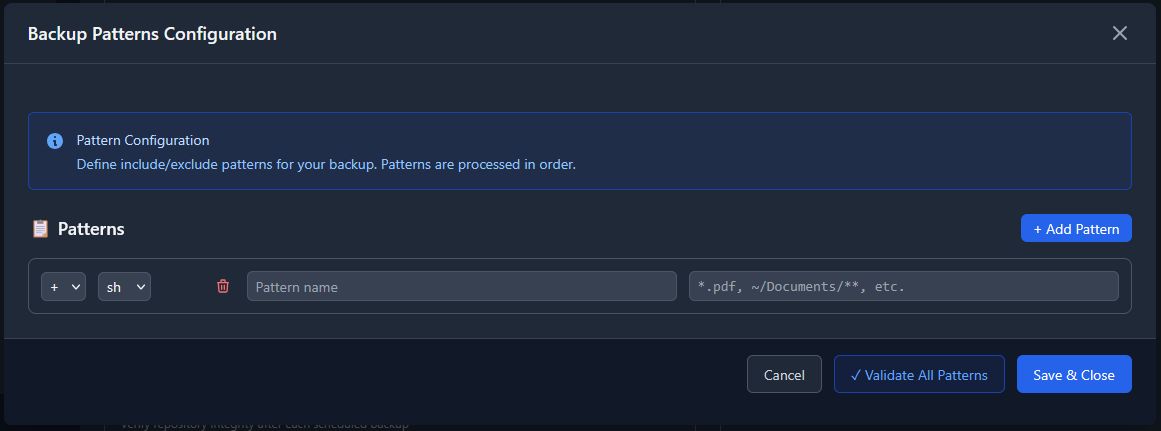
The pattern configuration interface includes:
Pattern list: Shows all configured patterns in processing order
Add Pattern button: Creates new include/exclude patterns
Action selector: Choose include (+), exclude (-), or exclude with no recursion (!)
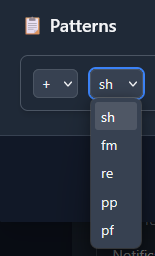
Style selector: Select pattern matching style (sh, fm, re, pp, pf)
Pattern field: Enter the actual pattern to match
Validation: Real-time pattern validation and preview
Pattern Actions
Each pattern must specify an action that determines how matching files are handled:
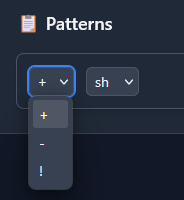
Include (+)
Action: Include matching files and directories in the backup.
Files matching this pattern will be backed up
Useful for explicitly including specific files or directories
Takes precedence over exclude patterns when there are conflicts
Example: + home/user/important
Exclude (-)
Action: Exclude matching files and directories from the backup.
Files matching this pattern will be skipped
Borgitory will still recurse into excluded directories to check for included files
Most commonly used action for filtering out unwanted files
Example: - *.tmp
Exclude with No Recursion (!)
Action: Exclude matching directories and do not recurse into them.
Completely skips the directory and all its contents
More efficient than regular exclude for large directories you never want to backup
Use for system directories, caches, or other large directories to ignore entirely
Example: ! home/user/.cache
Pattern Styles
Borgitory supports multiple pattern matching styles, each with different syntax and capabilities:
Shell Style (sh)
Default style for most pattern operations. Similar to shell glob patterns with enhanced directory matching.
Features:
- * matches any number of characters (except path separators)
- ? matches any single character
- ** matches zero or more directory levels
- [...] matches character ranges
- [!...] matches characters not in range
Examples:
- *.log - All log files
- home/*/Documents - Documents folder in any user’s home
- **/*.tmp - All .tmp files in any subdirectory
- home/user/** - Everything under home/user
Fnmatch Style (fm)
Traditional shell pattern matching without the ** directory wildcard.
Features:
- * matches any characters including path separators
- ? matches any single character
- [...] and [!...] for character matching
- No special ** syntax
Examples:
- *.o - All .o files
- home/*/junk - junk directories in user homes
- cache/* - Everything directly under cache directories
Regular Expression (re)
Full regular expression support for complex pattern matching.
Features:
- Complete regex syntax support
- Path separators normalized to forward slashes
- Substring matching (anchor with ^ and $ as needed)
- Most powerful but complex option
Examples:
- ^home/[^/]+\.tmp/ - Directories ending in .tmp under home
- \.(jpg|png|gif)$ - Image files with specific extensions
- ^.*/(cache|tmp)/ - Any cache or tmp directory
Warning: Regular expressions can be complex and potentially slow. Use simpler styles when possible.
Path Prefix (pp)
Matches entire directory trees by path prefix.
Features: - Matches the specified path and everything under it - Very efficient for large directory exclusions - Simple substring matching at path level
Examples:
- pp:home/user/Downloads - Downloads directory and all contents
- pp:var/cache - System cache directory tree
- pp:tmp - All temporary directories
Path Full-match (pf)
Matches exact file paths only.
Features: - Extremely efficient O(1) hashtable lookup - Must specify complete, exact paths - No wildcards or variables allowed - Ignores pattern order due to hashtable implementation
Examples:
- pf:home/user/secret.txt - Exact file match
- pf:etc/passwd - Specific system file
- pf:var/log/system.log - Exact log file
Pattern Processing Order
Critical: Patterns are processed in the order they appear in your configuration. The order determines which patterns take precedence when there are conflicts.
Processing Rules
Top to Bottom: Patterns are evaluated from first to last in your list
First Match Wins: The first pattern that matches a file determines its fate
Include Overrides: Later include patterns can override earlier exclude patterns
Efficiency: Place more specific patterns before general ones
Example Pattern Order
+ home/user/important/**     # Include important files first
- home/user/**/*.tmp         # Exclude temp files
- home/user/.cache/**        # Exclude cache
+ home/user/**               # Include everything else in user home
! var/cache/**               # Never recurse into system cache
In this example: - Important files are included even if they match later exclude patterns - Temp files are excluded from user directories - Cache directories are excluded - All other user files are included - System cache is completely skipped
Best Practices
Specific Before General: Place specific include patterns before general exclude patterns
Performance: Use
!(no recursion) for large directories you never wantTesting: Use the validation feature to test your patterns
Documentation: Add descriptive names to complex patterns
Pattern Validation
Borgitory provides real-time pattern validation to help you verify your configuration:
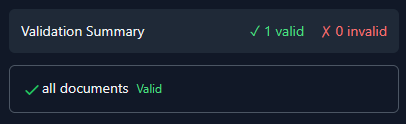
The validation system:
Syntax Check: Verifies pattern syntax is correct
Preview: Shows which files would match your patterns
Conflict Detection: Identifies potential pattern conflicts
Performance Warnings: Alerts about potentially slow patterns
Common Pattern Examples
System Files and Caches
! /proc                      # Skip system process directory
! /sys                       # Skip system directory
! /dev                       # Skip device directory
- **/.cache/**               # Exclude all cache directories
- **/node_modules/**         # Exclude Node.js dependencies
- **/__pycache__/**          # Exclude Python cache
User Data
+ home/*/Documents/**        # Include all user documents
+ home/*/Pictures/**         # Include all user pictures
- home/*/Downloads/**        # Exclude downloads
- home/*/.local/share/Trash/** # Exclude trash
Development Projects
+ home/user/projects/**/*.py    # Include Python source files
+ home/user/projects/**/*.js    # Include JavaScript files
+ home/user/projects/**/README* # Include documentation
- home/user/projects/**/build/** # Exclude build directories
- home/user/projects/**/.git/** # Exclude git repositories
Media Files
+ **/*.jpg                   # Include JPEG images
+ **/*.png                   # Include PNG images
+ **/*.mp4                   # Include MP4 videos
- **/*.tmp                   # Exclude temporary files
- **/Thumbs.db               # Exclude Windows thumbnails
Troubleshooting Patterns
Pattern Not Matching
Check Order: Ensure your pattern isn’t overridden by an earlier pattern
Verify Syntax: Use the validation feature to check pattern syntax
Test Style: Try different pattern styles (sh vs fm vs re)
Path Format: Ensure paths use forward slashes, even on Windows
Performance Issues
Use Path Prefix: Replace complex patterns with
pp:when possibleAvoid Complex Regex: Simplify regular expressions or use shell patterns
No Recursion: Use
!instead of-for large excluded directoriesOrder Optimization: Place frequently matching patterns first
Unexpected Inclusions
Check Include Patterns: Later
+patterns override earlier-patternsVerify Wildcards: Ensure
*and**behave as expectedTest Incrementally: Add patterns one at a time to isolate issues
Advanced Pattern Techniques
Conditional Includes
Include specific files only from certain directories:
+ home/*/projects/**/*.py    # Python files in projects
+ home/*/work/**/*.doc       # Documents in work folders
- home/**                    # Exclude everything else in home
Layered Exclusions
Create multiple layers of exclusions with exceptions:
+ **/important/**            # Always include important directories
- **/.git/**                 # Exclude git repositories
- **/node_modules/**         # Exclude dependencies
+ **/*.config                # But include config files
+ **                         # Include everything else
See Also
Installation Guide - Setting up Borgitory
How to Set Up Automated Backup Workflows - Creating scheduled backups
Troubleshooting Guide - Common issues and solutions
BorgBackup Pattern Documentation - Official BorgBackup pattern reference
Tip
Start with simple patterns and gradually add complexity. Use the validation feature frequently to ensure your patterns work as expected before running actual backups.